library(dplyr)
library(palmerpenguins)Working smarter with {dplyr} 1.2.0
A talk on the new functions introduced in the latest {dplyr} release.
Details
- 👥 R-Ladies Abuja
- 📆 24 June 2026 // 06:00 PM WAT
- 💻️ Virtual
Description
Discover how the latest features in {dplyr} 1.2.0 can help you write cleaner, faster, and more maintainable data transformation workflows. This session explores practical techniques for filtering, joining, summarizing, and reshaping data more efficiently, with real-world examples that demonstrate how to streamline your R code and improve productivity.
Slides
Recording
Summary
This summary was generated by Claude Sonnet 5 and reviewed by me.
dplyr 1.2.0 shipped a set of functions that make two very common jobs — dropping rows and recoding values — say what they actually mean.
TipThe short version
| Instead of… | Reach for… |
|---|---|
filter(!cond) |
filter_out(cond) |
filter() with an OR operator |
filter(when_any(...)) |
& groups nested inside an OR |
when_all() inside when_any() |
case_when(x == "a" ~ ...) |
recode_values(x, "a" ~ ...) |
case_when(..., .default = x) to tweak a few values |
replace_values() / replace_when() |
filter_out()
Drops rows where all conditions match — and keeps NA rows, because a row with a missing value was never shown to match.
penguins |>
  filter_out(island == "Torgersen" & body_mass_g > 4000)
# A tibble: 333 × 8
species island bill_length_mm bill_depth_mm flipper_length_mm body_mass_g
<fct> <fct> <dbl> <dbl> <int> <int>
1 Adelie Torgersen 39.1 18.7 181 3750
2 Adelie Torgersen 39.5 17.4 186 3800
3 Adelie Torgersen 40.3 18 195 3250
4 Adelie Torgersen NA NA NA NA
5 Adelie Torgersen 36.7 19.3 193 3450
6 Adelie Torgersen 39.3 20.6 190 3650
7 Adelie Torgersen 38.9 17.8 181 3625
8 Adelie Torgersen 34.1 18.1 193 3475
9 Adelie Torgersen 37.8 17.1 186 3300
10 Adelie Torgersen 37.8 17.3 180 3700
# ℹ 323 more rows
# ℹ 2 more variables: sex <fct>, year <int>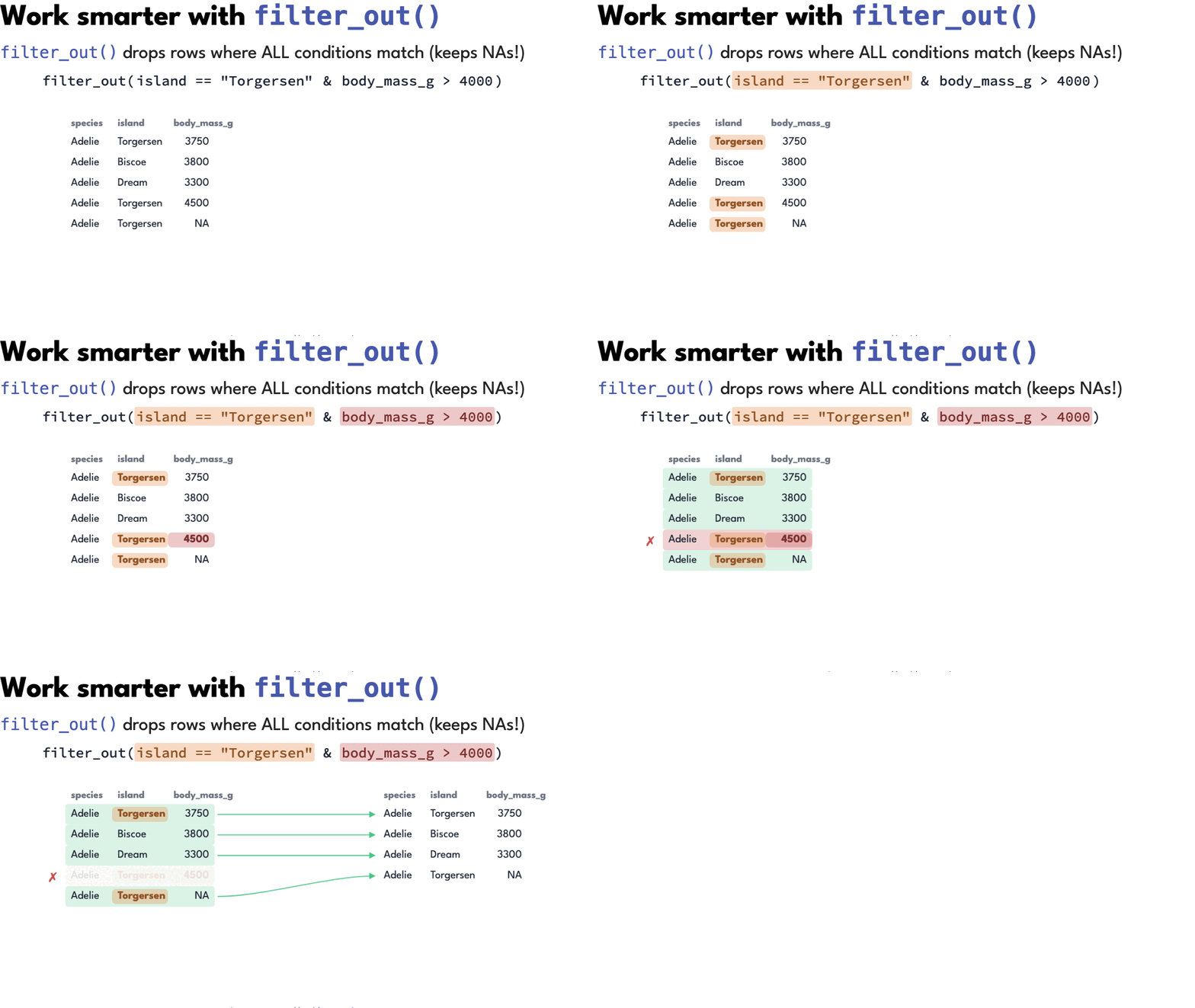
Rule of thumb: if there’s a ! in your filter(), reach for filter_out().
when_any()
Expresses OR logic as a list of alternatives: keep the row if it matches at least one.
penguins |>
  filter(when_any(
    species == "Adelie",
    body_mass_g > 5000
  ))
# A tibble: 213 × 8
species island bill_length_mm bill_depth_mm flipper_length_mm body_mass_g
<fct> <fct> <dbl> <dbl> <int> <int>
1 Adelie Torgersen 39.1 18.7 181 3750
2 Adelie Torgersen 39.5 17.4 186 3800
3 Adelie Torgersen 40.3 18 195 3250
4 Adelie Torgersen NA NA NA NA
5 Adelie Torgersen 36.7 19.3 193 3450
6 Adelie Torgersen 39.3 20.6 190 3650
7 Adelie Torgersen 38.9 17.8 181 3625
8 Adelie Torgersen 39.2 19.6 195 4675
9 Adelie Torgersen 34.1 18.1 193 3475
10 Adelie Torgersen 42 20.2 190 4250
# ℹ 203 more rows
# ℹ 2 more variables: sex <fct>, year <int>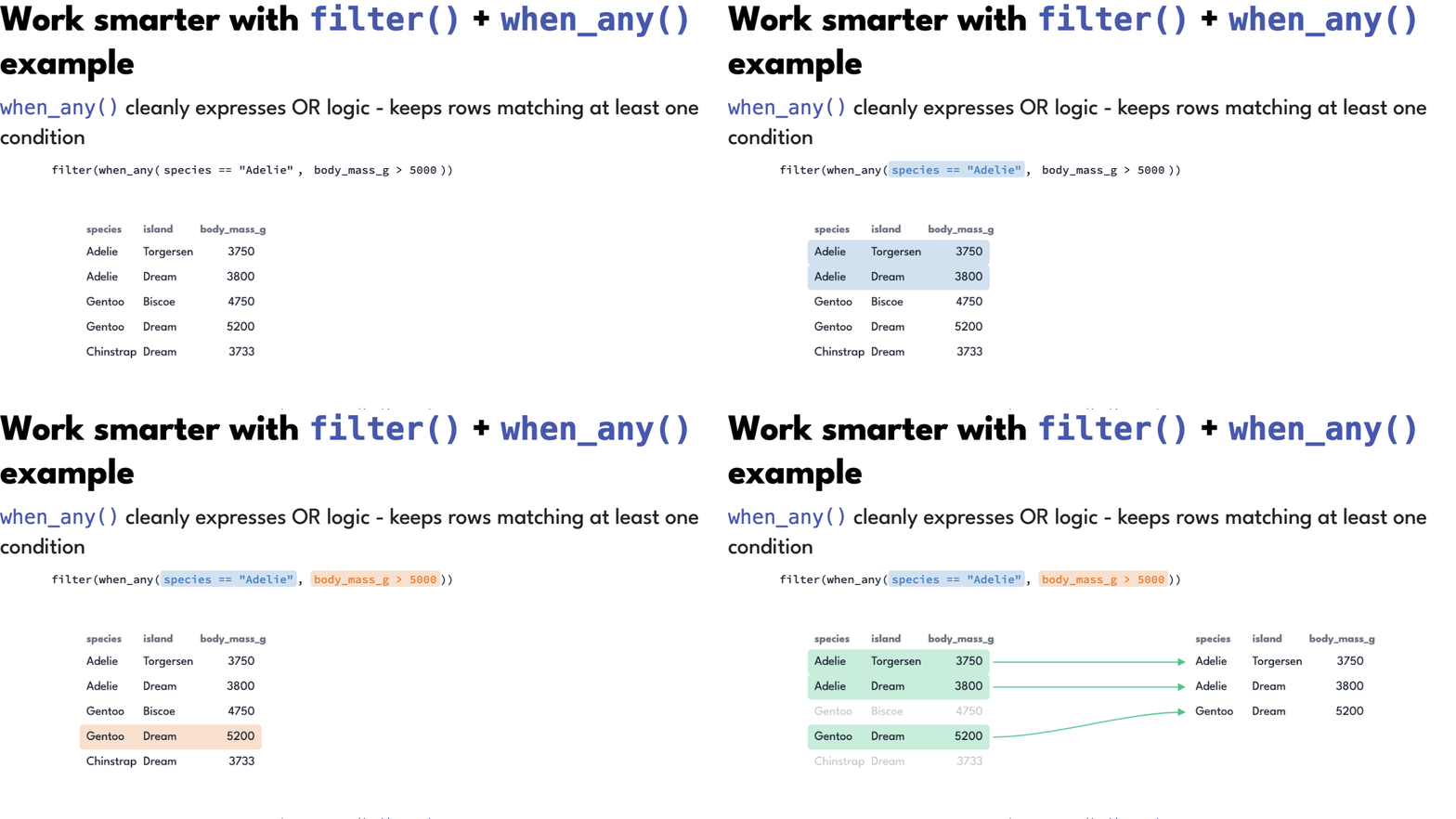
Rule of thumb: if your filter() has complex OR expressions, reach for when_any().
when_all()
The AND counterpart: keep the row only if it matches every condition.
penguins |>
  filter(when_all(
    species == "Gentoo",
    body_mass_g > 5000
  ))
# A tibble: 61 × 8
species island bill_length_mm bill_depth_mm flipper_length_mm body_mass_g
<fct> <fct> <dbl> <dbl> <int> <int>
1 Gentoo Biscoe 50 16.3 230 5700
2 Gentoo Biscoe 50 15.2 218 5700
3 Gentoo Biscoe 47.6 14.5 215 5400
4 Gentoo Biscoe 46.7 15.3 219 5200
5 Gentoo Biscoe 46.8 15.4 215 5150
6 Gentoo Biscoe 49 16.1 216 5550
7 Gentoo Biscoe 48.4 14.6 213 5850
8 Gentoo Biscoe 49.3 15.7 217 5850
9 Gentoo Biscoe 49.2 15.2 221 6300
10 Gentoo Biscoe 48.7 15.1 222 5350
# ℹ 51 more rows
# ℹ 2 more variables: sex <fct>, year <int>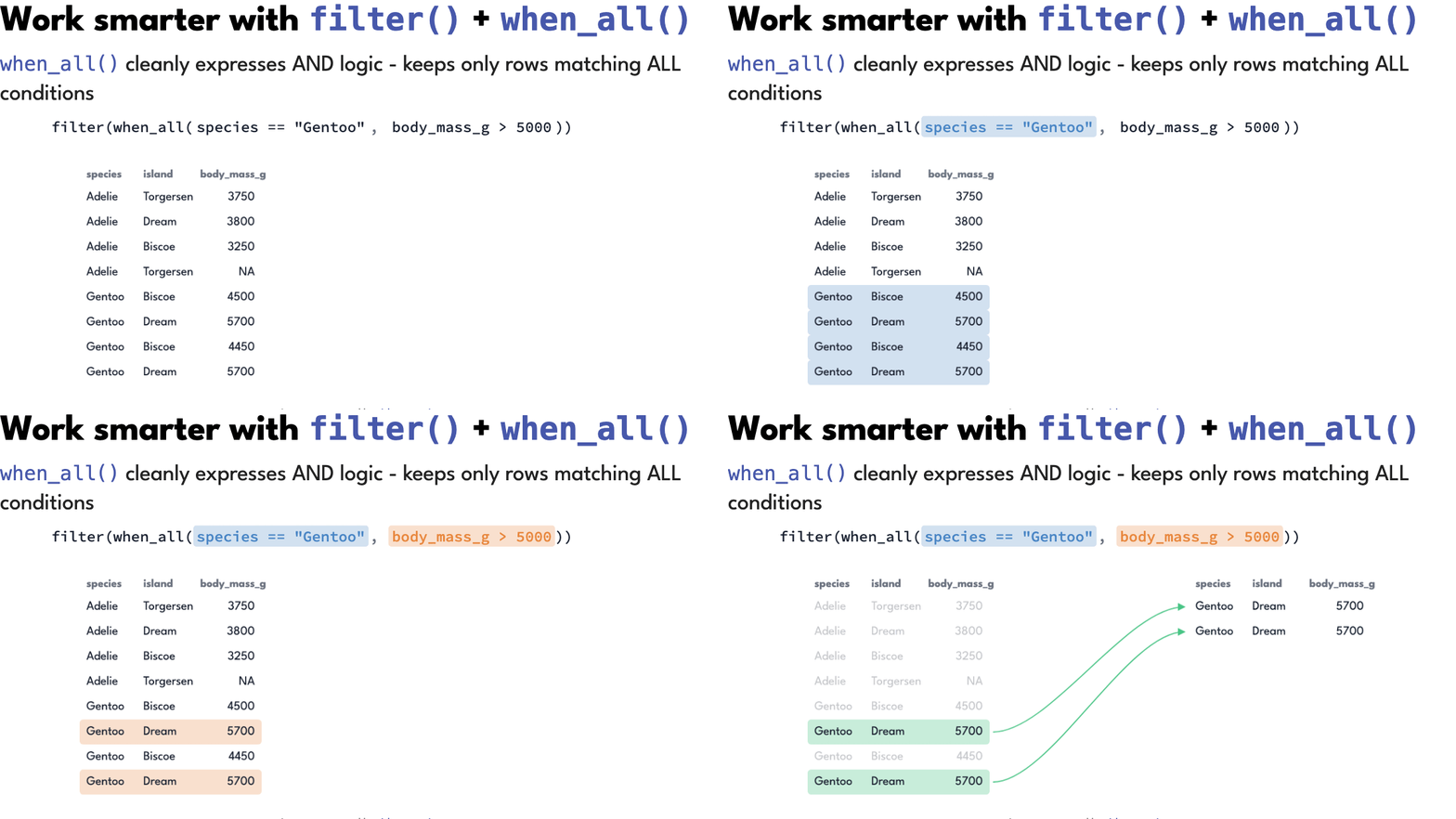
Rule of thumb: for a simple AND you don’t need it — commas in filter() already mean AND. Its real job is nesting.
when_all() inside when_any()
Nest them and complex logic reads as an outline instead of an expression.
penguins |>
  filter(when_any(
    when_all(species == "Adelie", island == "Torgersen", body_mass_g > 3700),
    when_all(species == "Gentoo", body_mass_g > 5000)
  ))
# A tibble: 83 × 8
species island bill_length_mm bill_depth_mm flipper_length_mm body_mass_g
<fct> <fct> <dbl> <dbl> <int> <int>
1 Adelie Torgersen 39.1 18.7 181 3750
2 Adelie Torgersen 39.5 17.4 186 3800
3 Adelie Torgersen 39.2 19.6 195 4675
4 Adelie Torgersen 42 20.2 190 4250
5 Adelie Torgersen 38.6 21.2 191 3800
6 Adelie Torgersen 34.6 21.1 198 4400
7 Adelie Torgersen 42.5 20.7 197 4500
8 Adelie Torgersen 46 21.5 194 4200
9 Adelie Torgersen 41.8 19.4 198 4450
10 Adelie Torgersen 39.7 18.4 190 3900
# ℹ 73 more rows
# ℹ 2 more variables: sex <fct>, year <int>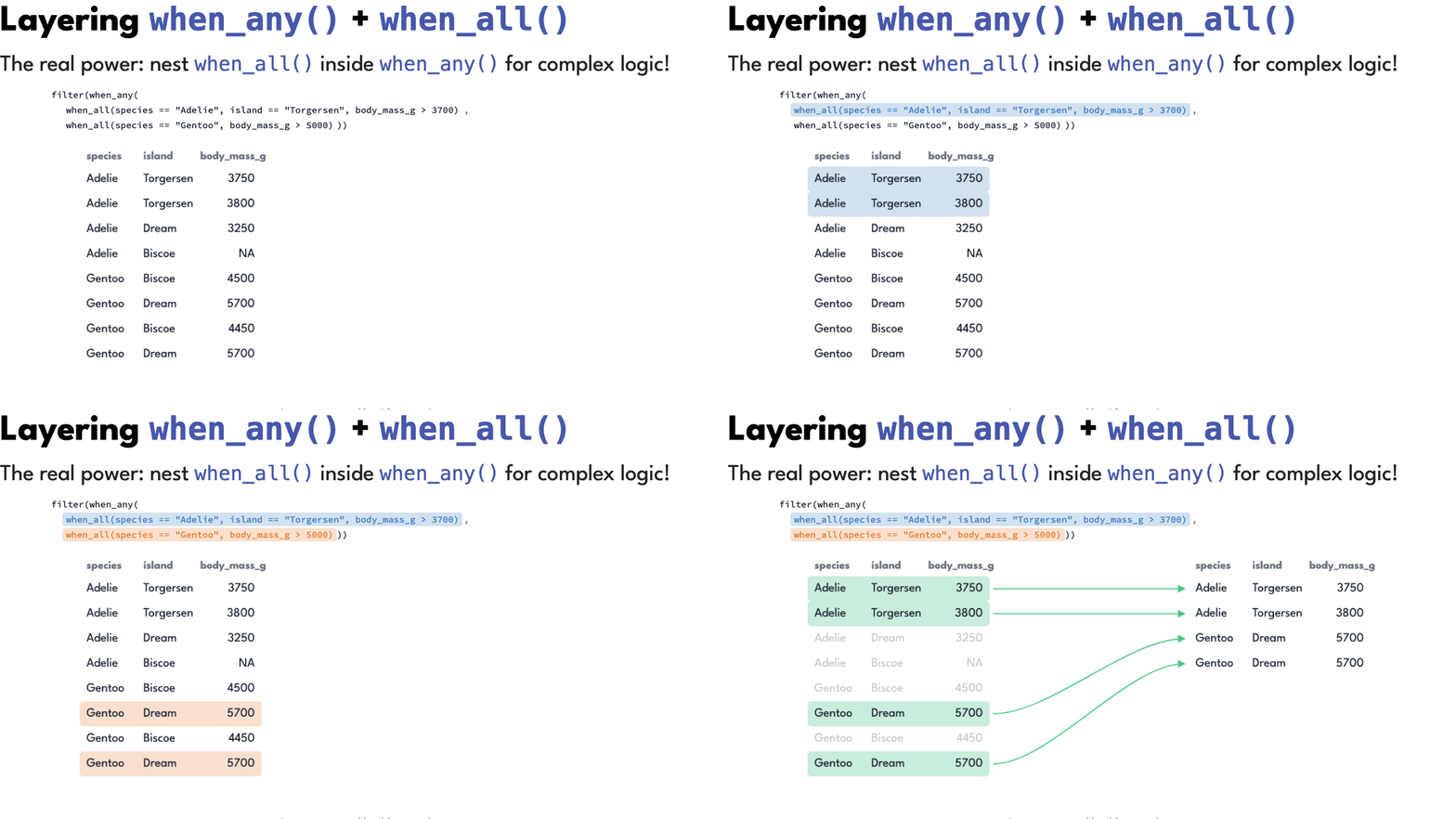
Rule of thumb: reach for the nested form when each alternative needs more than one condition.
recode_values()
Matches values directly instead of writing column == over and over. Name the column once, then list the mappings.
penguins |>
  mutate(island_location = island |> recode_values(
    "Biscoe"    ~ "Southwest",
    "Dream"     ~ "Northwest",
    "Torgersen" ~ "Northwest"
  ))
# A tibble: 344 × 9
species island bill_length_mm bill_depth_mm flipper_length_mm body_mass_g
<fct> <fct> <dbl> <dbl> <int> <int>
1 Adelie Torgersen 39.1 18.7 181 3750
2 Adelie Torgersen 39.5 17.4 186 3800
3 Adelie Torgersen 40.3 18 195 3250
4 Adelie Torgersen NA NA NA NA
5 Adelie Torgersen 36.7 19.3 193 3450
6 Adelie Torgersen 39.3 20.6 190 3650
7 Adelie Torgersen 38.9 17.8 181 3625
8 Adelie Torgersen 39.2 19.6 195 4675
9 Adelie Torgersen 34.1 18.1 193 3475
10 Adelie Torgersen 42 20.2 190 4250
# ℹ 334 more rows
# ℹ 3 more variables: sex <fct>, year <int>, island_location <chr>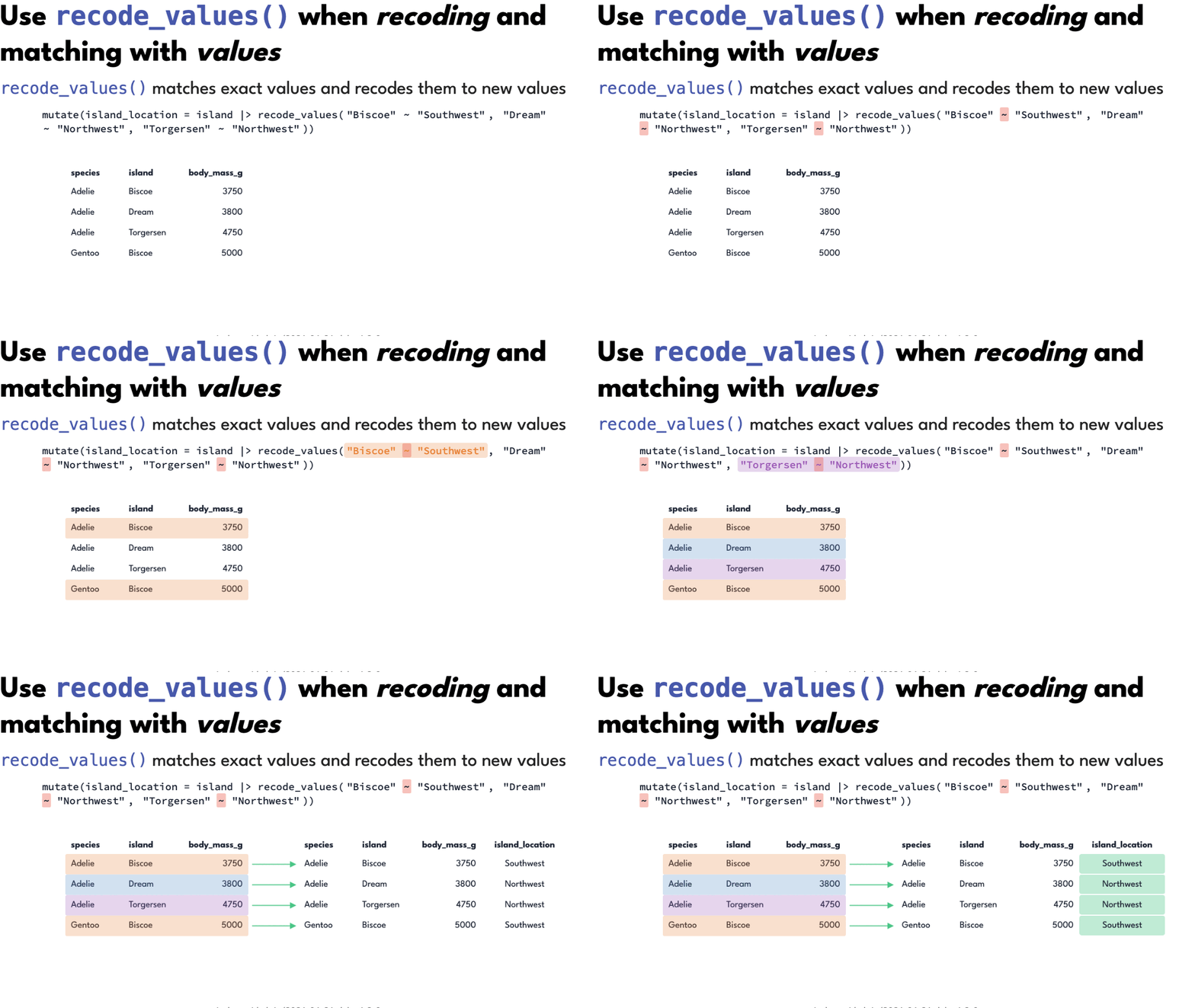
Add unmatched = "error" and a stray category raises an error instead of silently becoming NA.
Rule of thumb: if you’re writing == inside case_when(), reach for recode_values().
recode_values() with a lookup table
Because the mappings are values rather than code, they can live in a data frame — which means they can live in a spreadsheet, a database, or someone else’s repo.
lookup <- tibble(
  from = c("Biscoe", "Dream", "Torgersen"),
  to   = c("Southwest", "Northwest", "Northwest")
)

penguins |>
  mutate(
    island_location = recode_values(island, from = lookup$from, to = lookup$to)
  )
# A tibble: 344 × 9
species island bill_length_mm bill_depth_mm flipper_length_mm body_mass_g
<fct> <fct> <dbl> <dbl> <int> <int>
1 Adelie Torgersen 39.1 18.7 181 3750
2 Adelie Torgersen 39.5 17.4 186 3800
3 Adelie Torgersen 40.3 18 195 3250
4 Adelie Torgersen NA NA NA NA
5 Adelie Torgersen 36.7 19.3 193 3450
6 Adelie Torgersen 39.3 20.6 190 3650
7 Adelie Torgersen 38.9 17.8 181 3625
8 Adelie Torgersen 39.2 19.6 195 4675
9 Adelie Torgersen 34.1 18.1 193 3475
10 Adelie Torgersen 42 20.2 190 4250
# ℹ 334 more rows
# ℹ 3 more variables: sex <fct>, year <int>, island_location <chr>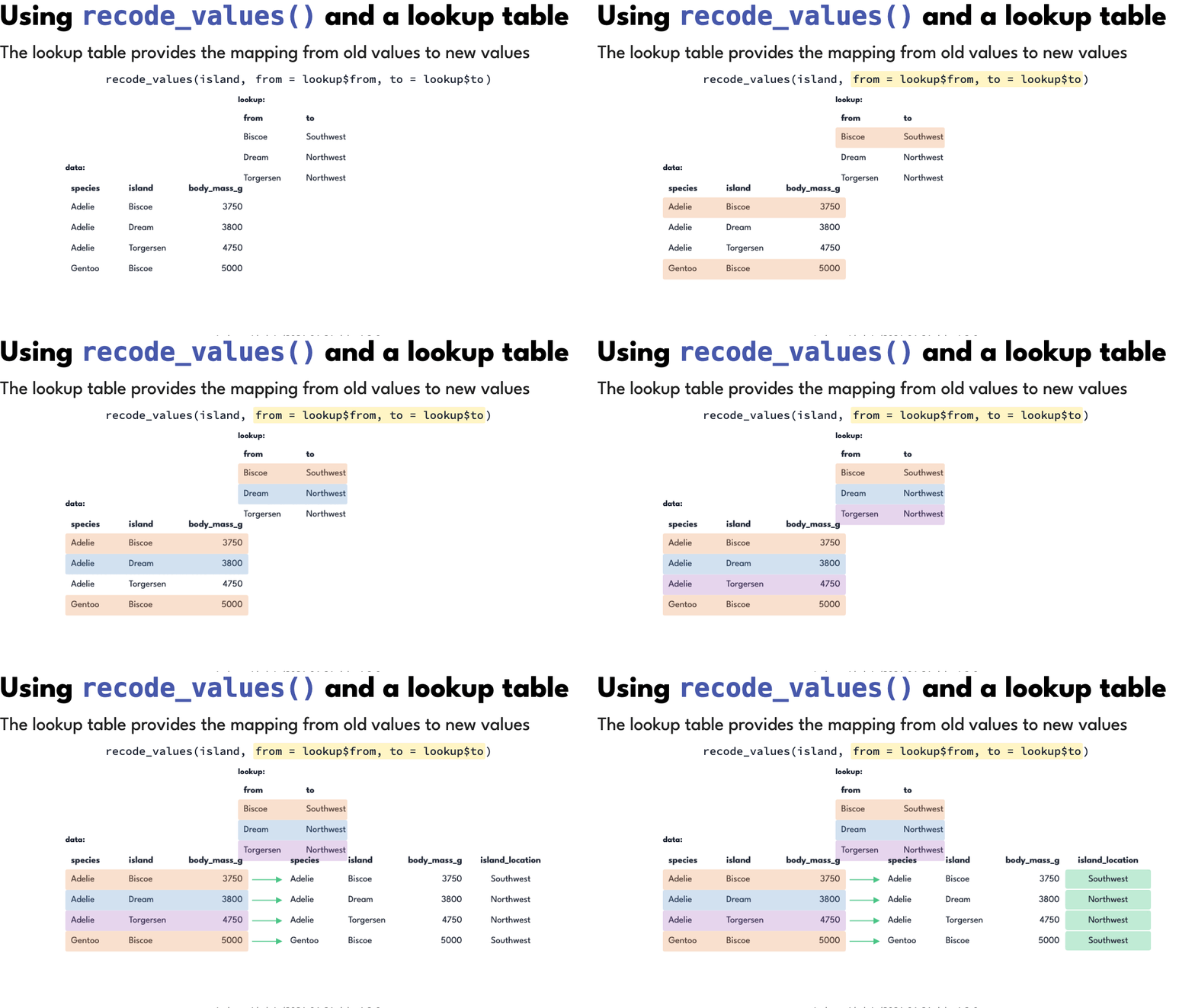
Rule of thumb: once you have more than a handful of mappings, put them in a lookup table.
replace_values() and replace_when()
case_when() and recode_values() create a column, so every row needs a value and anything uncovered needs a .default. The replace_*() family modifies a column instead — unmatched values simply stay as they are.
# swap specific values
penguins_located |>
  mutate(
    island_location = island_location |>
      replace_values(
        "Northwest" ~ "Northern Palmer Archipelago"
      )
  )

# swap values matching a condition
penguins |>
  mutate(body_mass_g = replace_when(body_mass_g, body_mass_g > 5000 ~ 5000))
Rule of thumb: if you want to change some values and keep the rest, reach for replace_*() rather than case_when() with a .default.
Summary
⬢ Use filter() to keep rows
⬢ Use filter_out() to drop rows — especially if you’re reaching for !
⬢ Use when_any() for OR logic, when the expressions get complex
⬢ Use when_all() for AND logic, especially nested inside when_any()
⬢ Use recode_values() for exact matches, instead of == in case_when()
⬢ Use replace_values() / replace_when() to modify an existing column